
Infinite Gallery / Menu
April 14, 2009 by: smonte
In this new and interesting Flash and ActionScript 3 tutorial I will teach you how to create an infinite gallery. This will also work perfectly for menus and so on. Let’s get started straight away!
Note: You need TweenMax in order to fully complete this tutorial.
Getting the images
Download six images (100×100) that you want to use in this tutorial. I downloaded the images from FreeDigitalPhotos.net.


Creating the Flash document
Create a new Flash (ActionScript 3) document of size 500×200. Make the background black.
Importing the Images to Flash
From the menu select File -> Import -> Import to Stage. Select the images that you have decided to use in this tutorial.

The images should now be on the stage.
Positioning the Images
Position the images vertically to the center of the stage. Space them evenly horizontally (leave some space between the images). You can use the align buttons to help you out.


Converting the Images to Movie Clips
Convert the leftmost image to a movie clip. Name it “My Image 1″ and set the registration point to the left edge.

Repeat this step to the rest of the images. Name them “My Image 2″, “My Image 3″ and so on…
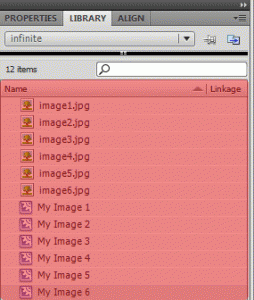
Your library should now look like the following.
Adding ActionScript 3
Double click the “My Image 1″ movie clip. You should now be “inside” the movie clip. Go ahead and create a new layer called “actions”.


In the actions layer type the following code.
//Import TweenMax
import gs.*;

//Set the initial state for this movie clip
TweenMax.to(this, 0.5, {alpha: 0.4});

//Add mouse over & out event listeners
this.addEventListener(MouseEvent.MOUSE_OVER, mouseOverHandler);
this.addEventListener(MouseEvent.MOUSE_OUT, mouseOutHandler);

//This function is called when mouse is over this movie clip
function mouseOverHandler(e:Event):void {

        //Tween the alpha
        TweenMax.to(this, 0.5, {alpha: 1});
}

//This function is called when mouse is out of this movie clip
function mouseOutHandler(e:Event):void {

        //Tween the alpha
        TweenMax.to(this, 0.5, {alpha: 0.4});
}
Repeat this step to the rest of the images! We simply add some functionality when the user hovers over an image…
More Movie Clips
Now that we have the individual images all set up, we can start building the infinite gallery. In the main timeline, select all six image movie clips. Convert them to a single movie clip named “Gallery Images”.

and Still More Movie Clips …
In order to have the illusion of an endless loop of images, we need another instance of “Gallery Images” movie clip on the stage. So drag another “Gallery Images” movie clip on the stage and position it behind the first instance so that they are horizontally aligned.

The Last Movie Clip
Select both instances of the “Gallery Images” movie clips that are on the stage. Convert them to a single movie clip named “Infinite Gallery” and set the registration point to the left edge.

Give this movie clip an instance name of “infiniteGallery”.

Adding Final ActionScript 3
In the main timeline, create a new layer called “actions”. Type the following code.
//Import TweenMax
import gs.*;

//Save the horizontal center
var centerX:Number = stage.stageWidth / 2;

//Save the width of the whole gallery
var galleryWidth:Number = infiniteGallery.width;

//Speed of the movement (calculated by the mouse position in the moveGallery() function)
var speed:Number = 0;

//Add an ENTER_FRAME listener for the animation
addEventListener(Event.ENTER_FRAME, moveGallery);

function moveGallery(e:Event):void {

        //Calculate the new speed
        speed = -(0.05 * (mouseX - centerX));

        //Update the x coordinate
        infiniteGallery.x+=speed;

        //Check if we are too far on the right (no more stuff on the left edge)
        if (infiniteGallery.x>0) {

                //Update the gallery's coordinates
                infiniteGallery.x= (-galleryWidth/2);
        }

        //Check if we are too far on the left (no more stuff on the right edge)
        if (infiniteGallery.x<(-galleryWidth/2)) {

                //Update the gallery's coordinates
                infiniteGallery.x=0;
        }

}
This code is responsible for the illusion of an infinite loop. We simply check when we are too far on the left or the right side and repostion the “infiniteGallery” movie clip accordingly.
Final words
That’s it for this tutorial. I hoped you enjoyed it and learned some new ways of working with Flash and ActionScript 3. Feel free to download the .fla file to have a closer look. Comments are always welcome!
Download .fla


Related tutorials:
Comments
37 Responses to “Infinite Gallery / Menu”Leave a Reply
You must be logged in to post a comment.


stu says:
December 20, 2009 at 5:18 pm
1172: Definition gs could not be found.
is this tutorial at all salvageable?? this totally fails, what is the meaning of this message – do i have to do something else to make this run?
thanks
———————–
Stu, The new TweenMax changed there folder structure to com now instead of gs.
when importing, try import com.* instead of import gs.*
And also be sure that the COM folder is present in the same folder as your fla your testing.
1172: Definition gs could not be found.
is this tutorial at all salvageable?? this totally fails, what is the meaning of this message – do i have to do something else to make this run?
thanks
1172: Definition gs could not be found.
this totally fail to work.
can you tell me what is wrong, is this at all a salvageable tutorial?
thanks
Hi everyone, I am newbie to AS3, how can I create an infinite flash menu that moves when mouse is clicked not on the Event ENTER_FRAME?!
Anyhelp please:)
Nice menu, very aesthetically pleasing. Movement is very smooth as well, I love the ease.
It works for me now. My problem was that on the “LAST MOVIE” step I wrote “infinitegallery” instead of “infiniteGallery” (with the capitol G).
So maybe that is the same problem some of you are having as well.
oto yedek parça turkey
Anyone know how to slow the scrolling before the mouse enters the stage?
Hello.
This is a very good-looking gallery.
However, there is one problem.
Every time, the speed quickens when six thumbnails round.
Can this problem be solved?
It embarrasses it very much.
Can you use TweenMax on Flash CS3.
maybe this is where I am going wrong.
Help, Help, Help
I am new to all this but slowly understanding how AS3 works but still have much to learn.
any way I am having problems with TweenMax in this tutorial, I have pasted infiniteGallery into the same folder as TweenMax but I still get 19 errors all about this line.
TweenMax.to(this, 0.5 {alpha: 1});
they all are related to MovieClip- MyImages. I have check all the lines and everything is in order, same as tutorial.
Does anybody have any suggestions as to where I am going wrong.
Any help will do.
Thansk
earthflyer
This gallery is excellent!
However, does anyone know how to slow down the speed of the gallery when you do not mouseover the images?
thank you.
This is a great tutorial worked for me… thanks a lot..
But how can I add images later to this infinite gallery mc
Do I have to update also the first Mc’s?
thanks
veeery nice !!!
but don’t you have one of this for up and bottom, not right and left, do you ?
Can you do a horizontal menu with zoom. PS: love your tutorials, I don’t know why everybody is having a hard time. Keep up the good work.
Hi for all.
First.. who is having problems with tween max to install, is because isn’t to be installed exactly!!! All you have to do it’s save the project in the paste into tween max, called “GS”, or a copy of “GS” into same folder that your *.fla project is saved.
But, I admit… I still have a problem.
now that’s saved, appear a wrong “1120: Access of undefined property TweenMax.”.
The rest it’s exactly like tutorial.
You guys would need to copy the ‘gs’ folder into the same folder your .fla is saved in. Hope this helps!
This menu is beautiful. I’m having the same problem with this that I’ve had with similar menus…How can you make these buttons load images? In my attempts the large images move back and forth with the menu! An answer to this will be valuable – it will address the problem of not being able to use _root.
I saw Michael (on May 8, 2009 at 5:02 am) had similar problem….
here is a newbie solution…
I went inside the “infinite gallery” then inside the “Gallery Images” movie clips and create a new layer called “actions” . This is where I created my inserted page…. following “Master” smonte’s tutorial on http://tutorials.flashmymind.com/2009/02/website-with-actionscript-3/
what I did is I gave the pictures the same instance names as explained in “website with actionscript 3″ tutorial, thus; page01Button, page02Button and so on.
it worked but the problem is… the inserted swf files are moving the same direction as the rest of the thumbnails… please help! so the swf doesn’t move.
very useful i have done the thing without tweenmax by converting the thumbnail to btns and giving transitions that way but the base code to loop was very very usefull thanks a lot sir
Hi,
this tutorial is very nice but I have problem. When I debug file so Flash write me this error: location: TweenMax.as, Line 1… description: 5007: An ActionScript file must have at least one externally visible definition. What I must do? Please help.
Thanks
no se como instalar el TweenMax.
espero me puedan ayudar
Download the TweenMax but do not know how or where to install it recognize flash
Beautiful and simple… however i have a dumb question….see, i´ve already got Tween Max….so the question is: How do i installe it? where to? i do have it on my desktop…what now?
I´ll be so glad to get an answer…thaks a lot
i like this menuuu
Your Tutorial work perfect, however I’m trying to make them clickable so that they popup into a different window. Do you have any suggestions on the best course of action to code this feature in.
ah.. yes that was the problem ! I didnt download the tweenmax
thanks alot:).
Hey, sry to hear that you guys have trouble with the tut… First question, have you installed TweenMax as the tutorial suggests?
hey,
just as Torb i get this same 2 errors that say:
Location – Scene 1, layer `actions´, Frame 1, line 2
description – 1172: Definition gs could not be found.
hope you can help me .
.
hey ..it doesnt work for me im new to this..pls help? there are errors in the script
there are some errors in this im new to this..pls help me?
nice, boy i sure could have used this post last week:
after some serious time spent on something that in my mind seemed so much simpler, i have it working pretty smoothly without any masking by severely optimizing my AS2 code – if the client hadn’t requested it, AS3 would have been a much faster and smoother production means as well as an end result.
Hi smonte,
Looks really nice!
I´m brand new to this and when I test the movie I get 2 errors that both says:
Scene 1, layer `actions´, Frame 1, 1172: Definition gs could not be found.
Heh ok, I will fix it later on today
Hey smonte really nice gallery, looks great! However, as this guy above me just said, it doesn’t go in the direction you’d want it to go. Very little adjustments to the code should make this possible.
What an annoying menu. It goes the way you dont want it to go. Always the opposite direction of what you are trying to select.