
Flash Mouse Trailer with Stars
April 9, 2009 by: smonte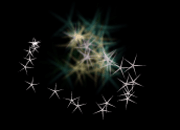
This Flash and ActionScript 3 tutorial shows you how to create a cool mouse trail effect with stars. Check out the final result! The look and feel is very easy to change to fit your needs.
Note: You need TweenMax in order to complete this tutorial.
Setting up the environment
1. Create a new Flash document of size 300×300.
2. Using the PolyStar tool , draw a star without any stroke. Use the following settings (fill color doesn’t matter).

3. Make the star of size 10×10.

4. Convert the star to a movie clip. Name it “My Star” and set the registration point to the center. Linkage the movie clip to a class named “MyStar”.
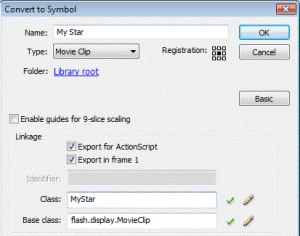
5. Give the star movie clip an instance name of “myStar”.
Moving to ActionScript
6. In the actions panel, type the following ActionScript code.
//Import TweenMax
import gs.*;

//Hide the mouse
Mouse.hide();

//The starting color
var currentColor:uint = 0xffffff;

//This timer calls the changeColor() function every 0.5 seconds
var colorTimer:Timer = new Timer(500, 0);
colorTimer.addEventListener(TimerEvent.TIMER, changeColor);
colorTimer.start();

//This timer calls the createStar() method every 0.01 seconds
var trailTimer:Timer = new Timer(10, 0);
trailTimer.addEventListener(TimerEvent.TIMER, createStar);
trailTimer.start();

//Add an ENTER_FRAME listener so we can move the myStar
addEventListener(Event.ENTER_FRAME, moveStar);

//This function is called in each frame
function moveStar(e:Event):void {

        //Set the myStar coordinates to match with the mouse coordinates
        myStar.x = mouseX;
        myStar.y = mouseY;
}

//This function is called by the colorTimer
function changeColor(e:Event):void {

        //Assign a new random color
        currentColor = Math.random() * 0xffffff;

        //Tween the myStar to the currentColor
        TweenMax.to(myStar, 0.2, {tint: currentColor});


}

//This function is called by the trailTimer
function createStar(e:Event):void {

        //Create a new star
        var newStar:MyStar = new MyStar();

        //Set the newStar coordinates to match with the myStar coordinates
        newStar.x = myStar.x;
        newStar.y = myStar.y;

        //Calculate random target x and y coordinates
        var targetX:Number = newStar.x + Math.random() * 64 - 32;
        var targetY:Number = newStar.y + Math.random() * 64 - 32;

        //Calculate a random rotation
        var targetRotation = Math.random() * 360 - 180;

        //Add the newStar to the stage
        addChild(newStar);

        /* Now we tween different properties of the newStar mc using TweenMax. I call the "TweenMax.to()" multiple times so it's easier to read this code. All of this could also be accomplished with one line. Note that we call the function removeStar() when the tweens are finished. */
        TweenMax.to(newStar, 3, {alpha: 0, scaleX: 5, scaleY: 5, tint: currentColor});
        TweenMax.to(newStar, 3, {rotation: targetRotation, x: targetX, y: targetY});
        TweenMax.to(newStar, 3, {blurFilter:{blurX:3, blurY:3}, onComplete: removeStar, onCompleteParams: [newStar]});
        }

//This function is called when a star's tween is finished
function removeStar(star:MyStar):void {

        //Remove the star from the stage
        removeChild(star);
}
7. We are done, test your movie! I hope enjoyed this Flash and ActionScript 3 tutorial and learned something new from it!
Download .fla


Related tutorials:
Comments
10 Responses to “Flash Mouse Trailer with Stars”Leave a Reply
You must be logged in to post a comment.


Nice Work !
@Jhon , The Fla is good , but you need an external library as said at the begining : TweenMax
(http://blog.greensock.com/tweenmaxas3/)
The file .fla is bad. Help me please.
very good, look forward to view your other articles
That’s a pretty cool mouse trail effect, reminds me of Disney. I’m a big fan of particle animation so I definitely appreciate this, thanks for sharing the source.
if without the Flash and ActionScript 3 software,how to download this flash on my computer?
heey, nice tutorial!..
i was just wondering is it normal that you cant click on things with this like a normal mouse?
Great tutorial! The effect is verry smooth
that was great!..
How do you use tween max with this? And which tween max action script do you use? o_o;;;
If you can help me out it would be very appreciated!
what can i do to get free tutorials of all design programms